AI MIDI Plugin for Ableton, FL Studio, and Logic Pro: How MIDI Agent Works in 2026
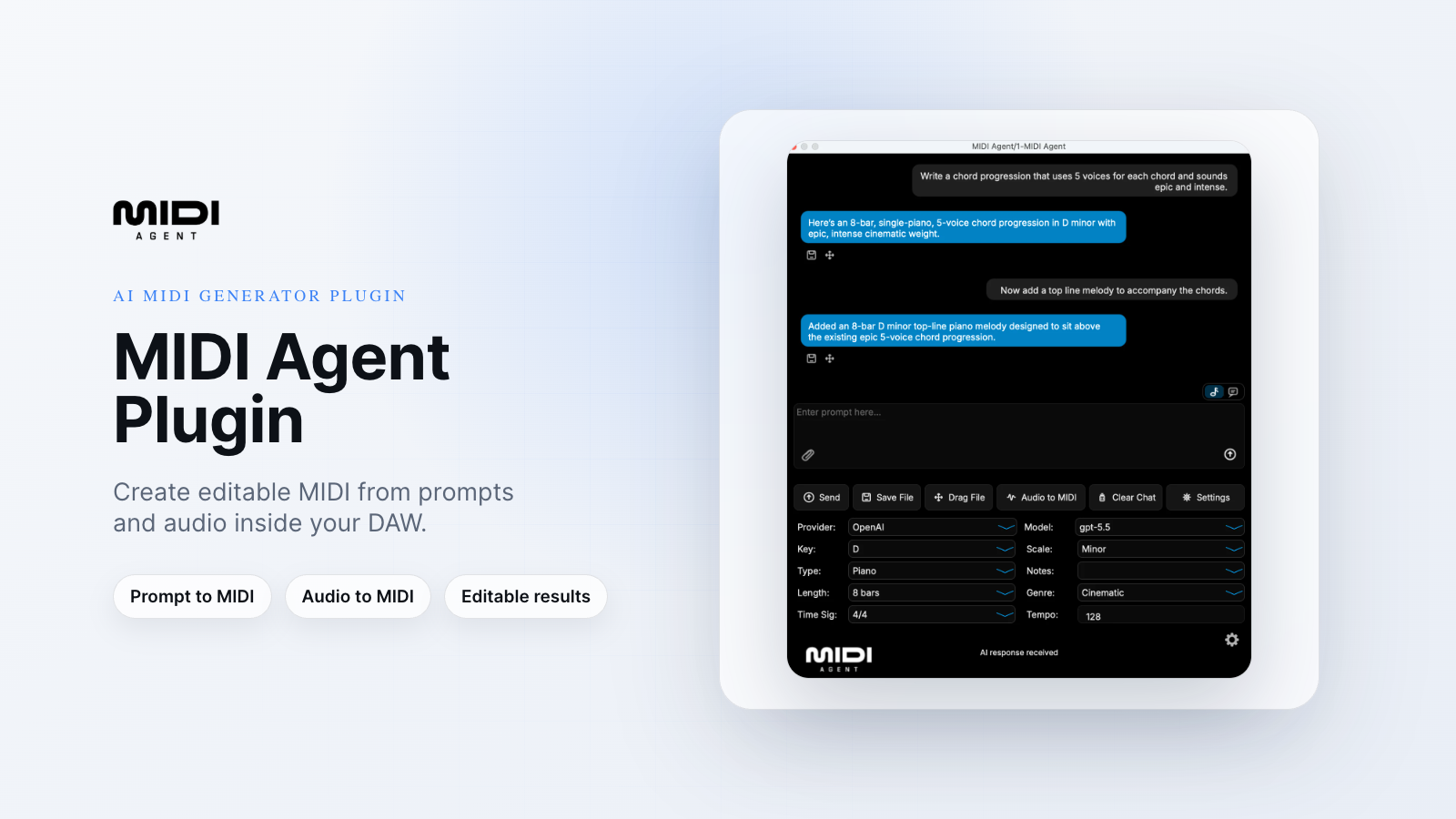
Most AI MIDI tools make you choose: either they work in your DAW but not someone else's, or they generate MIDI but not from a text prompt. If you're on FL Studio or Logic Pro, that usually means you're left out entirely.
MIDI Agent is built differently. It's a VST3, AU, AAX, and standalone plugin that runs inside every major DAW and generates melodies, chord progressions, basslines, and drum patterns from a plain-text prompt — powered by ChatGPT, Claude, Gemini, or whichever AI model you prefer.
Here's how it actually works, DAW by DAW.
What MIDI Agent Does
Type a prompt. Get MIDI. That's the core loop.
You describe what you want — "dark minor chord progression with tension, slow tempo" or "funky 16th-note bassline in E" — and MIDI Agent sends that prompt to a frontier AI model and returns editable MIDI directly into your session. No browser tabs. No copy-pasting. No leaving the piano roll.
Beyond text-to-MIDI generation, the plugin handles two other workflows that most AI MIDI tools skip:
- MIDI continuation — drop in an existing MIDI file and have AI generate a variation or continuation of it
- Audio-to-MIDI transcription — drop in an audio file and get editable MIDI back
Every output is stored locally on your machine. Nothing goes to a server. And everything you generate is yours — cleared for personal and commercial use.
How It Works in Ableton Live
In Ableton, MIDI Agent runs as a VST3 or AAX instrument on a MIDI track. Open it like any other instrument plugin, type your prompt in the interface, and the generated MIDI drops directly into the arrangement or clip slot you're working in.
The workflow stays inside Live. You're not switching windows or copying files between applications. If you want a variation on what you just generated, drop the MIDI clip back into the plugin and prompt from there.
This is the same prompt-based paradigm that tools like VIXSOUND use — but VIXSOUND is Ableton-only. If you work across multiple DAWs or collaborate with producers on different setups, that's a real limitation. MIDI Agent runs the same way in every supported DAW.
How It Works in FL Studio
FL Studio users load MIDI Agent as a VST3 instrument in the Channel Rack. From there, the plugin window opens inside your session and the workflow is identical: type a prompt, choose your AI model, get MIDI output.
Generated patterns drop into the Piano Roll, where you can edit them the same way you'd edit anything else. If you're working on a beat and need a bassline that fits a specific groove, you can describe it precisely and iterate without breaking your session flow.
The bring-your-own-API-key model is worth noting here. If you already have an OpenAI or Anthropic key, you paste it into the plugin settings once and you're done. No subscription required beyond the one-time plugin license. If you'd rather skip key management entirely, MIDI Agent Pro ($20/month) handles that for you and adds access to Google Lyria, ElevenLabs, and PozaLabs on top.
How It Works in Logic Pro
In Logic, MIDI Agent loads as an AU (Audio Units) instrument on a software instrument track. The interface is the same as in Ableton and FL Studio — consistent across DAWs by design.
Logic users working on film or TV scores will find the audio-to-MIDI transcription feature particularly useful. Drop in a reference audio file, get a MIDI transcription, and use it as a starting point for arrangement or orchestration. That's a workflow that usually requires a separate tool or a manual transcription process.
The plugin also supports Pro Tools (AAX), Cubase, Studio One, Reaper, Bitwig, GarageBand, and Reason. If your setup changes, your plugin comes with you.
Choosing Your AI Model
This is where MIDI Agent separates itself from every other AI MIDI tool on the market right now. You can choose which AI model generates your MIDI.
Supported providers include:
- OpenAI (GPT)
- Anthropic (Claude)
- Google Gemini
- xAI (Grok)
- DeepSeek
- OpenRouter, Ollama, LM Studio, Hugging Face (for local or custom model setups)
Pro subscribers also get access to Google Lyria, ElevenLabs, and PozaLabs — specialized providers for music and audio generation.
Different models interpret musical prompts differently. Some producers find Claude more literal and structured; others prefer the way GPT-4o handles genre-specific requests. Having the choice matters, and no competitor currently offers it.
Pricing and What You Get
The plugin license is $49 one-time (currently 50% off from $99) and includes lifetime updates. You bring your own API keys from any supported provider and pay only for what you generate through those providers.
MIDI Agent Pro is $20/month on top of the license. It adds managed AI access (no key management), exclusive providers, 500 AI generations per month, and priority support. Pro is optional — the base plugin is fully functional with your own keys.
There's no free trial, but the pricing is straightforward. One license, one DAW ecosystem, no lock-in.
How It Compares to Other Options
A few tools in this space are worth knowing about when you're evaluating:
VIXSOUND is the closest prompt-based competitor. It works well inside Ableton Live and bundles stem separation and DAW control alongside MIDI generation. But it's Ableton-only — no VST3, AU, or AAX. If you're on FL Studio or Logic Pro, it's not an option.
LANDR Composer covers chord progressions, basslines, and melodies across DAWs, but it's parameter-driven rather than text-prompt-driven. There's no natural language interface, and it's not powered by frontier LLMs.
Scaler 3 is a strong music theory tool — excellent for chord browsing and scale detection — but it's not a generative AI plugin. It helps you find chords; it doesn't generate patterns from a description.
The gap MIDI Agent fills: cross-DAW, text-prompt-native MIDI generation backed by frontier LLMs. That combination doesn't exist elsewhere right now.
Getting Started
Installation follows the standard plugin path for your DAW and OS. After purchase, you download the installer, choose your format (VST3, AU, or AAX), and the plugin appears in your DAW's instrument list. Add your API key in the settings panel, or connect your Pro subscription, and you're ready to generate.
The learning curve is minimal. If you know how to describe music, you know how to use MIDI Agent.
Learn more and get started at midiagent.com.
Frequently Asked Questions
Does MIDI Agent work in FL Studio and Logic Pro, or only Ableton? MIDI Agent works in all three. It's available as VST3 (Ableton, FL Studio, Cubase, Studio One, Reaper, Bitwig), AU (Logic Pro, GarageBand), and AAX (Pro Tools). The same plugin license covers all formats.
Do I need an API key to use MIDI Agent? You need either a personal API key from a supported provider (OpenAI, Anthropic, Google Gemini, etc.) or an active MIDI Agent Pro subscription. The Pro plan handles API access for you at $20/month. The base plugin license does not include API credits.
Who owns the MIDI I generate? You do. All generated MIDI is stored locally on your machine and is cleared for personal and commercial use. MIDI Agent does not retain your outputs on any server.
Can I use MIDI Agent to continue or vary existing MIDI ideas? Yes. Drop a MIDI file into the plugin and prompt the AI to generate a variation, continuation, or reharmonization of it. This works alongside the standard text-to-MIDI generation workflow.
What's the difference between the base license and MIDI Agent Pro? The $49 base license gives you the plugin with bring-your-own-key access to all standard providers. Pro ($20/month) adds managed API access (no key setup), exclusive providers like Google Lyria and ElevenLabs, 500 AI generations per month, and priority support.
Can MIDI Agent transcribe audio into MIDI? Yes. Drop an audio file into the plugin and it will return an editable MIDI transcription. This works inside any supported DAW.
Which AI models does MIDI Agent support? OpenAI (GPT), Anthropic (Claude), Google Gemini, xAI (Grok), DeepSeek, OpenRouter, Ollama, LM Studio, and Hugging Face. Pro subscribers also get access to Google Lyria, ElevenLabs, and PozaLabs.
