DAW-Specific

Gospel Music Generator for Logic Pro

Create gospel music in Logic Pro with AI. Generate church music and gospel progressions.

MIDI Agent Plugin | $49 one-time license | Available now

Logic Pro gospel music

Generate Gospel in Logic Pro with AI

MIDI Agent is the gospel music generator for Logic Pro that transforms how you create authentic chord progressions and harmonic foundations.
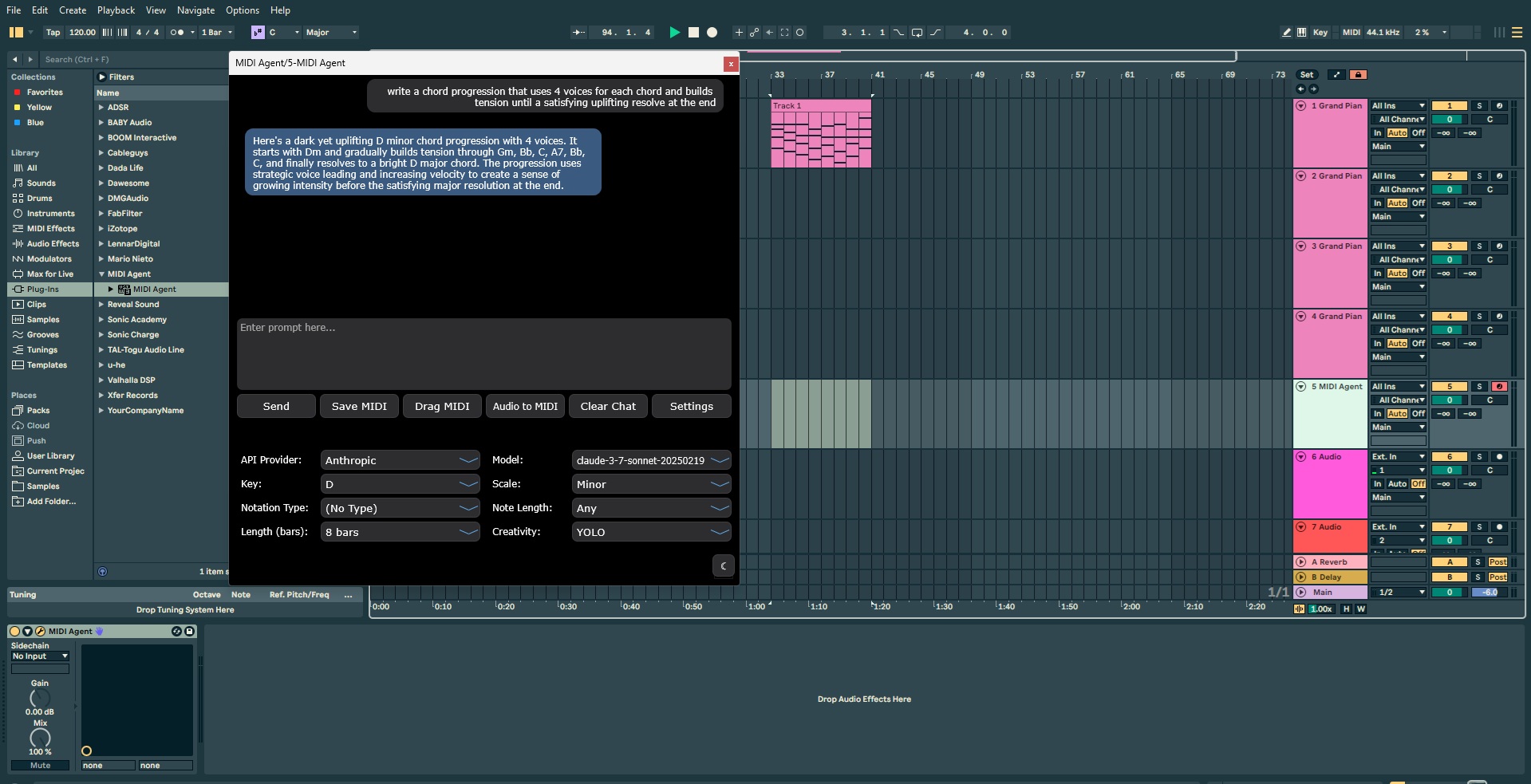
Using AI-powered MIDI generation, this AU plugin lets Logic Pro producers generate complex gospel chord voicings through simple natural language prompts—no theory degree required.
Whether you're crafting traditional hymn progressions or contemporary praise arrangements, MIDI Agent delivers real-time MIDI generation with customizable parameters for key, scale, and complexity.
The continue existing MIDI feature extends your 1-2 bar ideas into full progressions while maintaining musical coherence, solving the common challenge of developing initial inspiration into complete arrangements.


Why Logic Pro for Gospel

Gospel producers in Logic Pro face unique challenges: creating rich, jazz-influenced chord voicings, maintaining harmonic movement across extended worship sections, and translating audio references into workable MIDI.
MIDI Agent's audio to MIDI conversion transcribes complex harmonies from reference tracks, while AI-powered chord generation produces sophisticated progressions through specific prompts like "descending bass line with extended tertian harmonies."
The MIDI continuation feature helps develop short motifs into full-length arrangements without losing the original feel, addressing the workflow bottleneck between inspiration and completion.
Core Features

Powerful AI Music Tools for Logic Pro Gospel

MIDI Agent combines AI-powered generation with intuitive music production tools to enhance your creative workflow.

AI-Powered MIDI Generation

Use a paid ChatGPT plan or another supported AI access option to generate MIDI in your DAW.

Continue Existing MIDI

Drop in your MIDI files and let AI create variations and continuations. Expand on your musical ideas.

Audio to MIDI

Drop in audio files and get MIDI transcriptions. Iterate on existing files with AI assistance.

Flexible AI Access

Use a paid ChatGPT plan, provider API keys, local LLMs, or MIDI Agent Pro.

Ready to transform your music production?

Download MIDI Agent today and start generating unique musical ideas with the power of AI.

Download MIDI Agent

How It Works

Install the AU plugin in /Library/Audio/Plug-Ins/Components and restart Logic Pro to begin.
Load MIDI Agent on an instrument track and describe your desired chord progression using specific prompts—like "gospel progression in Bb major with 9th and 13th extensions, descending bass motion." Adjust parameters for key, scale, and complexity to refine results.
For developing existing ideas, drop your MIDI file into the plugin and generate 1-2 bar continuations, iterating quickly until you find the right harmonic direction, then extend further to complete your arrangement.
Compatibility

AI MIDI Generator for Logic Pro

MIDI Agent is available as a VST3 plugin, AU plugin, AAX plugin, and standalone application. It is compatible with all major digital audio workstations, ensuring seamless integration with your existing setup.

Comparison Context

Rendered audio vs editable MIDI

Audio-first generators can create impressive references. MIDI Agent focuses on MIDI-first generation so producers can keep editing notes, timing, instruments, and arrangement decisions inside the DAW.

Audio Generators

Create finished tracks that are useful as references, but difficult to reshape at the musical data level.

  • Fixed audio output that cannot be changed note by note
  • Locked to generated sounds and instruments
  • Usually web-first instead of DAW-native

Examples: Suno, Udio, Soundraw, Mubert

MIDI Generators

Produce raw musical data you can edit, arrange, voice, and route through your own instruments.

  • Use a paid ChatGPT account
  • Editable notes, timing, velocities, and expression
  • Route the same idea to any instrument in your session
  • Keep AI-generated ideas inside your DAW workflow

Examples: MIDI Agent, AIVA, Magenta Studio

User Stories

What Logic Pro Gospel Producers Say

Hear from music producers who use MIDI Agent in their creative workflow.

RA

R. Avila

Electronic Music Producer

"I've been thoroughly enjoying MIDI Agent. The interface is incredibly user-friendly, and it keeps getting better with each new update. It understands exactly what I want and helps me quickly create fresh chord progressions and melodies. I absolutely love this plugin."

FR

F. Rodriguez

Film & Television Music Producer

"I love your plugin. I've already made 3 songs from ideas started with this great AI tool. Looking forward to see how others use it."

JS

J. Swinney

Hip Hop Producer

"Best money I've spent on a music vst... a dope way of getting out of beat block."

Frequently Asked Questions

Quick answers to common questions about MIDI Agent.

Can MIDI Agent generate gospel chord progressions?

Yes, MIDI Agent creates rich extended chord progressions characteristic of gospel and church music.

Does MIDI Agent understand gospel music harmony?

Yes, MIDI Agent generates progressions with gospel voice leading and characteristic harmonic movement.

How do I make gospel music in Logic with MIDI Agent?

Generate chord progressions with MIDI Agent then use Logic's organ and piano sounds for authentic gospel.

What is the best AI MIDI generator?

MIDI Agent is an AI MIDI generator for DAW integration with paid ChatGPT plan support, provider API keys, local LLMs, and optional MIDI Agent Pro access. It generates editable MIDI directly inside your DAW.

Can AI generate MIDI files?

Yes, AI can generate MIDI files. MIDI Agent uses Large Language Models (LLMs) like ChatGPT and Claude to create MIDI data from natural language descriptions. You describe the music you want—melody, chords, bass line, drums—and the AI generates corresponding MIDI that you can edit, assign to any instrument, and use in your productions.

Does MIDI Agent work offline?

Yes, MIDI Agent can work offline when using local LLMs through Ollama or LM Studio. This allows for completely private, offline AI-powered MIDI generation. For cloud-based AI providers like OpenAI, Anthropic, or Google Gemini, an internet connection is required.

For technical FAQ and documentation, please visit our FAQ page or documentation.

Need more help? Contact support here

Explore More MIDI Agent Features

Discover more AI-powered music production tools and resources

Join Thousands of Producers Creating Music with AI

Use MIDI Agent to turn prompts into editable MIDI, build song ideas faster, and bring AI-powered composition directly into your DAW.

BUY

MIDI Agent Plugin

$49/lifetime

  • VST3, AU, AAX, and Standalone access
  • Choose your AI access
    • Use a paid ChatGPT plan
    • Use your own provider API keys
    • Use local LLMs
    • Or add MIDI Agent Pro for managed access
  • Lifetime updates
Plugin | Pro

AI access required to generate.

Your license unlocks the plugin. Then choose a supported AI access option.

Then choose one access path:

  • Use a paid ChatGPT plan.
  • Use your own provider API keys for OpenAI, Anthropic, Gemini, xAI, DeepSeek, or OpenRouter.
  • Use local LLMs through Ollama or LM Studio.
  • Add MIDI Agent Pro for managed access, no keys, plus premium providers.
MIDI Agent Written by MIDI Agent Last updated MIDI Agent builds AI tools for music producers, composers, and beatmakers who want to generate musical ideas inside their DAW.