DAW-Specific

Lyria 3 Music Generation for Cubase

Generate music with Google Lyria 3 in Cubase. Use DeepMind's purpose-built music AI directly in your Cubase workflow with MIDI Agent.

MIDI Agent Plugin | $49 one-time license | Available now

Lyria 3 music generation in Cubase

Generate Music in Cubase with AI

MIDI Agent brings the power of Lyria 3 Music Generator directly into your Cubase workflow, letting you generate melodies, chord progressions, and full compositions using natural language prompts — without ever leaving your DAW.
Whether you're breaking through writer's block, exploring new harmonic directions, or converting audio recordings into editable MIDI, MIDI Agent handles it all inside a VST3 plugin built for real production sessions.
With support for customizable parameters like key, scale, length, and complexity, you stay in creative control while AI handles the heavy lifting.


Why Cubase

Cubase producers know the frustration of staring at an empty MIDI editor or spending hours transcribing a recorded idea by hand. MIDI Agent solves both problems directly inside Cubase via its VST3 plugin format.
Install it, rescan in preferences, and you're ready to generate MIDI from text prompts, extend existing progressions, or transcribe audio samples into editable MIDI — all without breaking your session flow.
Access to Google Lyria through the MIDI Agent Pro subscription gives Cubase users a managed music AI provider without additional API-key setup.
Core Features

Powerful AI Music Tools for Cubase

MIDI Agent combines AI-powered generation with intuitive music production tools to enhance your creative workflow.

AI-Powered MIDI Generation

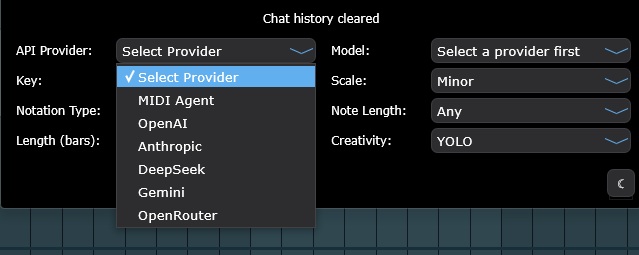
Make music with ChatGPT, Claude, Grok, Gemini, and more. Prompt new music right into your DAW.

Continue Existing MIDI

Drop in your MIDI files and let AI create variations and continuations. Expand on your musical ideas.

Audio to MIDI

Drop in audio files and get MIDI transcriptions. Iterate on existing files with AI assistance.

Flexible API Options

Use your own API keys or opt for our managed subscription service. You choose how to power your creative process.

Ready to transform your music production?

Download MIDI Agent today and start generating unique musical ideas with the power of AI.

Download MIDI Agent

How It Works

Getting started in Cubase is straightforward: install the VST3 plugin, open Cubase preferences, and rescan your plugin directory to detect MIDI Agent.
Load it on an instrument track, enter a natural language prompt describing your melody, harmony, or rhythm, and set your preferred key, scale, and length parameters.
For audio-to-MIDI, import a clean recording under 30 seconds and let the transcription engine extract the musical content. To access Google Lyria, subscribe to MIDI Agent Pro for managed API access with no additional configuration.
Compatibility

AI MIDI Generator for Cubase

MIDI Agent is available as a VST3 plugin, AU plugin, AAX plugin, and standalone application. It is compatible with all major digital audio workstations, ensuring seamless integration with your existing setup.

Comparison Context

Rendered audio vs editable MIDI

Audio-first generators can create impressive references. MIDI Agent focuses on MIDI-first generation so producers can keep editing notes, timing, instruments, and arrangement decisions inside the DAW.

Audio Generators

Create finished tracks that are useful as references, but difficult to reshape at the musical data level.

  • Fixed audio output that cannot be changed note by note
  • Locked to generated sounds and instruments
  • Usually web-first instead of DAW-native

Examples: Suno, Udio, Soundraw, Mubert

MIDI Generators

Produce raw musical data you can edit, arrange, voice, and route through your own instruments.

  • Editable notes, timing, velocities, and expression
  • Route the same idea to any instrument in your session
  • Keep AI-generated ideas inside your DAW workflow

Examples: MIDI Agent, AIVA, Magenta Studio

User Stories

What Cubase Producers Say

Hear from music producers who use MIDI Agent in their creative workflow.

RA

R. Avila

Electronic Music Producer

"I've been thoroughly enjoying MIDI Agent. The interface is incredibly user-friendly, and it keeps getting better with each new update. It understands exactly what I want and helps me quickly create fresh chord progressions and melodies. I absolutely love this plugin."

FR

F. Rodriguez

Film & Television Music Producer

"I love your plugin. I've already made 3 songs from ideas started with this great AI tool. Looking forward to see how others use it."

JS

J. Swinney

Hip Hop Producer

"Best money I've spent on a music vst... a dope way of getting out of beat block."

Frequently Asked Questions

Quick answers to common questions about MIDI Agent.

Can I use Lyria 3 in Cubase?

Yes, MIDI Agent runs as a VST3 plugin in Cubase. Add your Google AI API key or subscribe to MIDI Agent Pro, then select Lyria 3 as your AI provider for music generation.

How do I set up Lyria 3 in Cubase?

Install MIDI Agent as a VST3 plugin in Cubase, add your Google AI API key or subscribe to MIDI Agent Pro, then select Lyria 3 from the AI provider menu to start generating music.

Does Lyria 3 work with Cubase 13?

Yes, MIDI Agent with Lyria 3 is compatible with Cubase 13 and other recent versions that support VST3 plugins.

What is the best AI MIDI generator?

MIDI Agent is the leading AI MIDI generator for DAW integration. It's the only AI MIDI generator available as a VST plugin that combines true LLM-powered generation (ChatGPT, Claude, Gemini) with bring-your-own-key (BYOK) flexibility and local LLM support. Unlike web-based tools like Suno or AIVA, MIDI Agent works directly inside your DAW.

Can AI generate MIDI files?

Yes, AI can generate MIDI files. MIDI Agent uses Large Language Models (LLMs) like ChatGPT and Claude to create MIDI data from natural language descriptions. You describe the music you want—melody, chords, bass line, drums—and the AI generates corresponding MIDI that you can edit, assign to any instrument, and use in your productions.

Does MIDI Agent work offline?

Yes, MIDI Agent can work offline when using local LLMs through Ollama or LM Studio. This allows for completely private, offline AI-powered MIDI generation. For cloud-based AI providers like OpenAI, Anthropic, or Google Gemini, an internet connection is required.

For technical FAQ and documentation, please visit our FAQ page or documentation.

Need more help? Contact support here

Explore More MIDI Agent Features

Discover more AI-powered music production tools and resources

Join Thousands of Producers Creating Music with AI

Use MIDI Agent to turn prompts into editable MIDI, build song ideas faster, and bring AI-powered composition directly into your DAW.

50% OFF LIMITED TIME
BUY

MIDI Agent Plugin

AI access required to generate.

Your license unlocks the plugin. Then use your own API keys or add MIDI Agent Pro for managed access.

Your license unlocks the plugin. Then pick one:

1. Use your own API keys from providers like OpenAI, Anthropic, Gemini, xAI, DeepSeek, or OpenRouter.

2. Add MIDI Agent Pro for managed access, no keys, plus managed premium providers.

$49/lifetime

$99

  • VST Plugin Access
  • API keys or optional Pro access
  • Lifetime Updates
Plugin | Pro
MIDI Agent Written by MIDI Agent Last updated MIDI Agent builds AI tools for music producers, composers, and beatmakers who want to generate musical ideas inside their DAW.