DAW-Specific

Indie Music Generator for Logic Pro

Create indie music in Logic Pro with AI. Generate indie rock and indie pop progressions and melodies.

Logic Pro indie music

Generate Indie in Logic Pro with AI

Creating authentic indie melodies in Logic Pro often means fighting creative blocks and spending hours tweaking MIDI notes to find the right hook. MIDI Agent is an AI MIDI generator VST plugin that transforms how you approach melody creation by letting you describe what you want in plain language. Generate melodies, chord progressions, and full compositions with natural language prompts, extend existing ideas with intelligent MIDI continuation, or convert your recorded guitar riffs into editable MIDI using audio to MIDI transcription. As an AU plugin built specifically for Logic Pro workflows, MIDI Agent integrates seamlessly into your creative process, helping you move from inspiration to finished melodies faster than ever.


Why Logic Pro for Indie

Indie producers in Logic Pro face a common challenge: translating the sound in your head into compelling MIDI melodies without losing creative momentum. MIDI Agent solves this by letting you generate melodies with customizable parameters like key, scale, and complexity, eliminating the blank-canvas paralysis that kills sessions. When you've got a great two-bar idea but can't figure out where it should go next, drop in your MIDI files to create variations and continuations that maintain musical coherence. For producers who capture ideas on guitar or vocals first, the audio to MIDI conversion extracts those musical ideas into editable MIDI you can refine directly in Logic.

Core Features

Powerful AI Music Tools for Logic Pro Indie

MIDI Agent combines cutting-edge AI technology with intuitive music production tools to enhance your creative workflow.

AI-Powered MIDI Generation

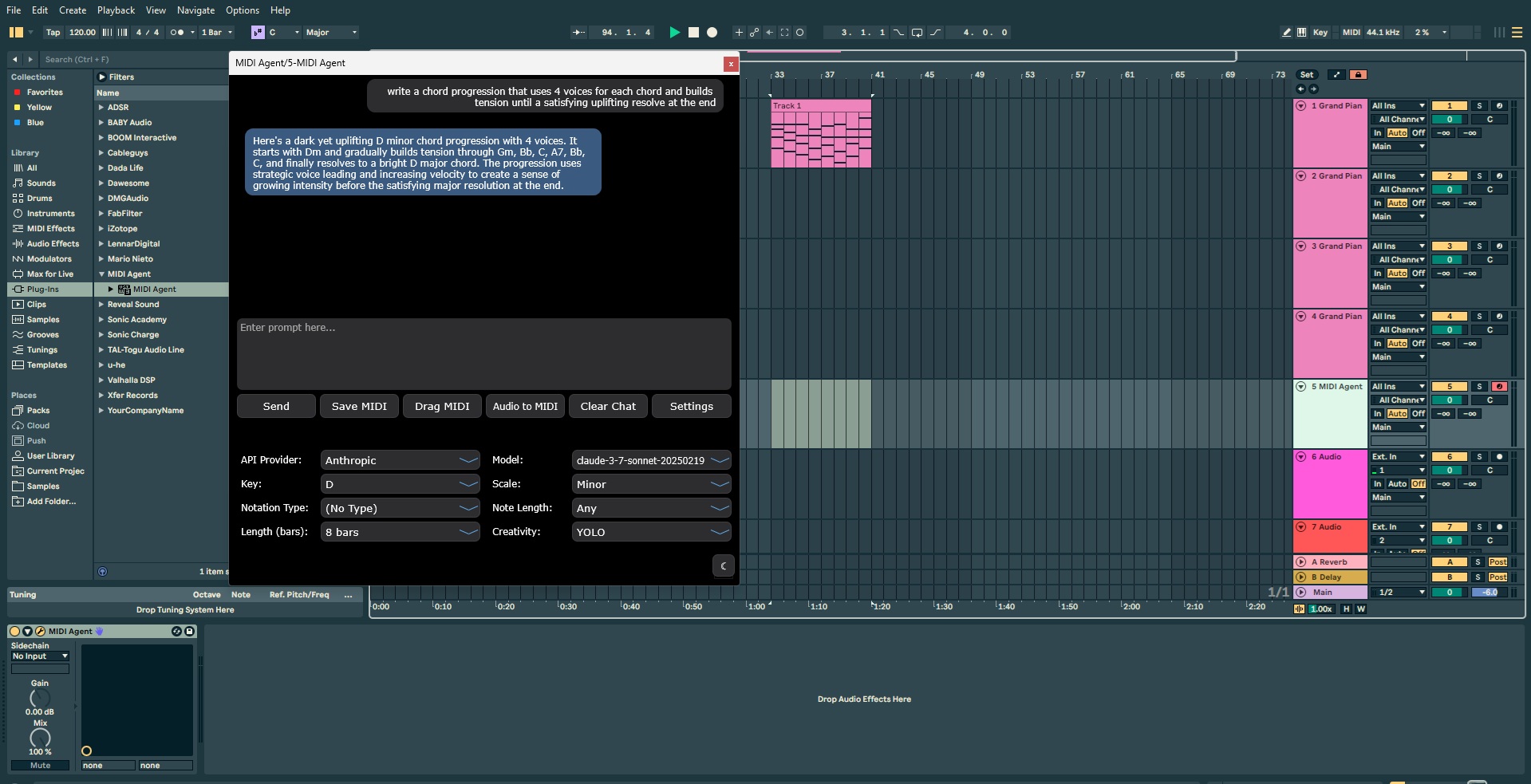
Make music with ChatGPT, Claude, Grok, Gemini, and more. Prompt new music right into your DAW.

  • Generate melodies, chord progressions, and full compositions with natural language prompts
  • Support for multiple AI providers including OpenAI, Anthropic, Google, DeepSeek, and more
  • Customizable generation parameters including key, scale, length, and complexity
  • Real-time MIDI generation directly in your DAW workflow
MIDI Agent AI MIDI generation interface

Continue Existing MIDI

Drop in your MIDI files and let AI create variations and continuations. Expand on your musical ideas.

  • Extend your existing melodies and progressions with AI assistance
  • Generate variations on your themes while maintaining musical coherence
  • Overcome creative blocks by letting AI suggest new directions
  • Seamlessly blend human creativity with AI-powered suggestions
MIDI Agent arrangement continuation in Ableton Live

Audio to MIDI

Drop in audio files and get MIDI transcriptions. Iterate on existing files with AI assistance.

  • Convert audio samples to MIDI with intelligent transcription
  • Extract musical ideas from recorded performances
  • Transcribe complex harmonies and rhythms with AI precision
  • Edit and refine transcriptions directly in your DAW
Audio to MIDI transcription view in MIDI Agent

Flexible API Options

Use your own API keys or opt for our managed subscription service. You choose how to power your creative process.

  • Connect with your existing API keys from OpenAI, Anthropic, and more
  • Option to use our managed subscription for simplified billing
  • Transparent usage tracking and cost management
  • Seamless switching between different AI providers
Supported AI providers in MIDI Agent

How It Works

Install the AU plugin in /Library/Audio/Plug-Ins/Components and restart Logic Pro to get started. Load MIDI Agent on a software instrument track and describe your desired melody using specific musical directions about note patterns, rhythmic feels, and harmonic elements. Set your key, scale, length, and complexity parameters to match your indie track's vibe, then generate MIDI in real-time directly into your workflow. For MIDI continuation, drop in your existing 1-2 bar idea, generate short sections iteratively, and extend once you find the right direction. All generated MIDI appears ready to edit in Logic's piano roll.

Compatibility

Works With Logic Pro

MIDI Agent is compatible with all major digital audio workstations, ensuring seamless integration with your existing setup.

Ableton Live DAW logo - MIDI Agent compatible digital audio workstation Ableton Live
FL Studio DAW logo - MIDI Agent compatible music production software FL Studio
Logic Pro DAW logo - Apple's professional music production software compatible with MIDI Agent AU plugin Logic Pro
Pro Tools DAW logo - Industry standard recording software (AAX support coming soon) Pro Tools AAX support coming soon
Cubase DAW logo - Professional music production software compatible with MIDI Agent Cubase
PreSonus Studio One DAW logo - Digital audio workstation compatible with MIDI Agent Studio One
Reaper DAW logo - Lightweight and flexible DAW compatible with MIDI Agent Reaper
Bitwig Studio DAW logo - Modern music production software compatible with MIDI Agent Bitwig Studio
Reason Studios DAW logo - Creative music production software compatible with MIDI Agent Reason
GarageBand DAW logo - Apple's beginner-friendly music production software GarageBand
User Stories

What Logic Pro Indie Producers Say

Hear from music producers who use MIDI Agent in their creative workflow.

RA

R. Avila

Electronic Music Producer

"I've been thoroughly enjoying MIDI Agent. The interface is incredibly user-friendly, and it keeps getting better with each new update. It understands exactly what I want and helps me quickly create fresh chord progressions and melodies. I absolutely love this plugin."

FR

F. Rodriguez

Film & Television Music Producer

"I love your plugin. I've already made 3 songs from ideas started with this great AI tool. Looking forward to see how others use it."

JS

J. Swinney

Hip Hop Producer

"Best money I've spent on a music vst... a dope way of getting out of beat block."

Frequently Asked Questions

Quick answers to common questions about MIDI Agent.

For technical FAQ and documentation, please visit our FAQ page or documentation.

Need more help? Contact support here

Explore More MIDI Agent Features

Discover more AI-powered music production tools and resources