Connect your ChatGPT account
Use your ChatGPT account with MIDI Agent to generate editable MIDI in your DAW. You can also use provider API keys, local models, or MIDI Agent Pro.
Use your ChatGPT account with MIDI Agent to generate MIDI notes you can edit in your DAW.
MIDI Agent Plugin | $49 one-time license | Available now
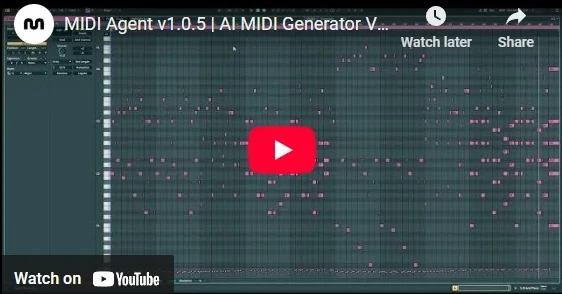
Watch a quick demonstration of MIDI Agent's capabilities and see how it can transform your music production workflow.
Use your ChatGPT account with MIDI Agent to generate editable MIDI in your DAW. You can also use provider API keys, local models, or MIDI Agent Pro.
Why it fits
Asking a general chat app for musical advice can help, but it usually leaves you translating text into notes manually. MIDI Agent keeps the prompt, model response, MIDI output, and DAW editing step close together. You describe the musical idea, generate MIDI, listen through your instruments, and revise in context.
What you can create
Use your ChatGPT account, provider API keys, or local models, or add MIDI Agent Pro to generate editable MIDI.
MIDI Agent comes packed with features designed to enhance your creative workflow and speed up music production.
Connect your ChatGPT account or use another supported AI access option to generate MIDI in your DAW.
Drop in your MIDI files and let AI create variations and extensions. Expand on your musical ideas.
Drop in audio files and get MIDI transcriptions. Iterate on existing files with AI assistance.
Use your ChatGPT account, provider API keys, or local models, or add MIDI Agent Pro.
Hear from music producers who use MIDI Agent in their creative workflow.
“I've been thoroughly enjoying MIDI Agent. The interface is incredibly user-friendly, and it keeps getting better with each new update...”
“I've been thoroughly enjoying MIDI Agent. The interface is incredibly user-friendly, and it keeps getting better with each new update...”
“I love your plugin. I've already made 3 songs from ideas started with this great AI tool. Looking forward to see how others use it.”
“We are using MIDI Agent specifically for its ability to understand complex genre prompts...It acts as a world-class session player...”
“I’m loving MIDI Agent. It’s genuinely transformed my workflow, and it’s the missing piece I’ve been trying to find for years.”
“Best money I've spent on a music vst... a dope way of getting out of beat block.”
Load MIDI Agent, choose a supported provider, and prompt for a specific musical part. For example, ask for a 4-bar progression, a counter-melody, or a bassline that follows an existing chord loop. Generate MIDI, then edit the result in the piano roll or extend the idea into the next section.
Describe the musical part, constraints, and production role you need.
Generate a short MIDI idea and audition it through your own instruments.
Edit, extend, vary, or regenerate the strongest result inside your session.
MIDI Agent is available as a VST3 plugin, AU plugin, AAX plugin, and standalone application. It is compatible with all major digital audio workstations, ensuring seamless integration with your existing setup.

VST3, AU

VST3, AU

AU

AAX

VST3

VST3, AU

VST3, AU

VST3

VST3

AU
Standalone application works outside your DAW and lets you export MIDI into any session.
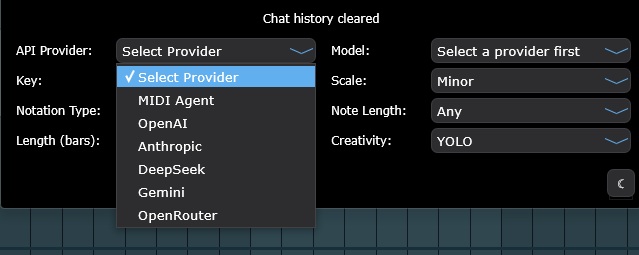
Connect your ChatGPT account, use provider API keys or local LLMs, or add MIDI Agent Pro.

Connect your ChatGPT account

OpenAI API key

Anthropic provider

Gemini provider

xAI provider

DeepSeek provider

OpenRouter provider

Ollama provider

LM Studio provider

Hugging Face provider
Upgrade to MIDI Agent Pro and get access to premium AI models for enhanced music creation
Audio tools can sketch ideas quickly, but MIDI keeps the notes editable in your DAW. Compare the workflow before choosing an AI music tool.
Create finished tracks that are useful as references, but difficult to reshape at the musical data level.
Examples: Suno, Udio, Soundraw, Mubert
Produce raw musical data you can edit, arrange, voice, and route through your own instruments.
Examples: MIDI Agent, AIVA, Magenta Studio
Use MIDI Agent to turn prompts into editable MIDI, build song ideas faster, and bring AI composition directly into your DAW.
$49/lifetime
$99
Quick answers to common questions about MIDI Agent.
Yes. You can use your ChatGPT account with MIDI Agent.
No. MIDI Agent connects AI prompts to a DAW workflow so the result becomes editable MIDI rather than plain text or a fixed audio file.
Yes. MIDI Agent Pro includes managed provider access, including Google Lyria models for full songs where supported, plus other supported provider options.
MIDI Agent is an AI MIDI generator for DAW integration with ChatGPT account support, provider API keys, local LLMs, and optional MIDI Agent Pro access. It generates editable MIDI directly inside your DAW.
Yes, AI can generate MIDI files. MIDI Agent uses Large Language Models (LLMs) like ChatGPT and Claude to create MIDI data from natural language descriptions. You describe the music you want—melody, chords, bass line, drums—and the AI generates corresponding MIDI that you can edit, assign to any instrument, and use in your productions.
Yes, MIDI Agent can work offline when using local LLMs through Ollama or LM Studio. This allows for completely private, offline AI MIDI generation. For cloud-based AI providers like OpenAI, Anthropic, or Google Gemini, an internet connection is required.
For technical FAQ and documentation, please visit our FAQ page or documentation.
Need more help? Contact support here
Discover more AI music production tools and resources
Use your ChatGPT account with MIDI Agent to generate MIDI in your DAW.
Generate editable MIDI melodies, chord progressions, basslines, and song sections from prompts inside your DAW with MIDI Agent.
Generate editable MIDI from natural-language prompts inside your DAW.
Compare MIDI-first and audio-first AI music workflows.
Turn text prompts into editable MIDI music in your DAW. MIDI Agent generates melodies, chords, basslines, and song sections you can revise and arrange.
Generate AI song ideas as editable MIDI in your DAW. MIDI Agent creates melodies, chords, basslines, and sections with VST3, AU, AAX, and Standalone workflows.
 Written by MIDI Agent Last updated MIDI Agent builds AI tools for music producers, composers, and beatmakers who want to generate musical ideas inside their DAW.